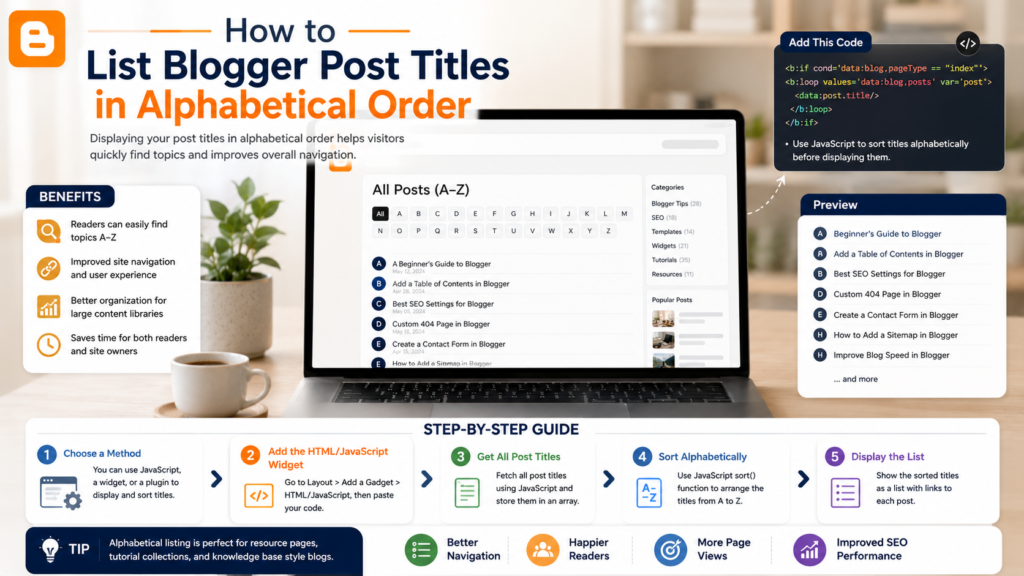
As blogs grow over time, finding older content can become increasingly difficult. While chronological archives work well for recent posts, they often become less useful once a site accumulates hundreds of articles across multiple topics.
For Blogger users managing large content libraries, creating an alphabetical archive of post titles can provide a much better browsing experience. Instead of scrolling through years of archives, readers can quickly locate content based on title, topic, or keyword.
An alphabetical post list is one of the simplest ways to transform a growing blog into a structured content library. For blogs with extensive archives, this small navigation improvement can dramatically improve content discovery and help valuable articles remain visible long after publication.
What Is an Alphabetical Post Title Archive?
An alphabetical archive displays blog post titles in A–Z order rather than by publication date.
Traditional Blogger archives typically organize posts by:
- Year
- Month
- Publication date
While useful for chronological browsing, these structures can become difficult to navigate as content grows.
An alphabetical archive focuses on accessibility. Readers can browse content by title and quickly locate specific articles without needing to know when they were published.
This approach is particularly useful for educational blogs, tutorial websites, resource hubs, and evergreen content libraries.
Why Create an Alphabetical Archive?
As your archive expands, readers often arrive looking for information rather than recent updates.
An alphabetical archive can help:
- Improve content discovery
- Make older articles easier to find
- Reduce navigation friction
- Support evergreen content
- Increase page views across older posts
- Create a cleaner archive experience
A well-organized archive makes a blog useful again by turning years of content into an accessible resource.
When Should Blogger Users Use an Alphabetical Archive?
This type of navigation works best when a blog contains:
- Dozens or hundreds of articles
- Multiple content categories
- Evergreen tutorials
- Reference material
- Educational content
- Resource collections
For small blogs with limited content, standard archives may be sufficient. However, once a blog reaches a substantial size, readers often benefit from alternative navigation systems.
How Alphabetical Archives Improve User Experience
Many visitors arrive at blogs through search engines rather than the homepage.
After reading one article, they may want to explore related content. Unfortunately, traditional archives are often difficult to navigate because they prioritize publication dates instead of discoverability.
An alphabetical archive helps readers browse more naturally.
For example, a visitor searching for Blogger tutorials can quickly scan an organized list and find relevant articles without digging through monthly archives.
This approach is especially useful for blogs that have accumulated years of valuable content.
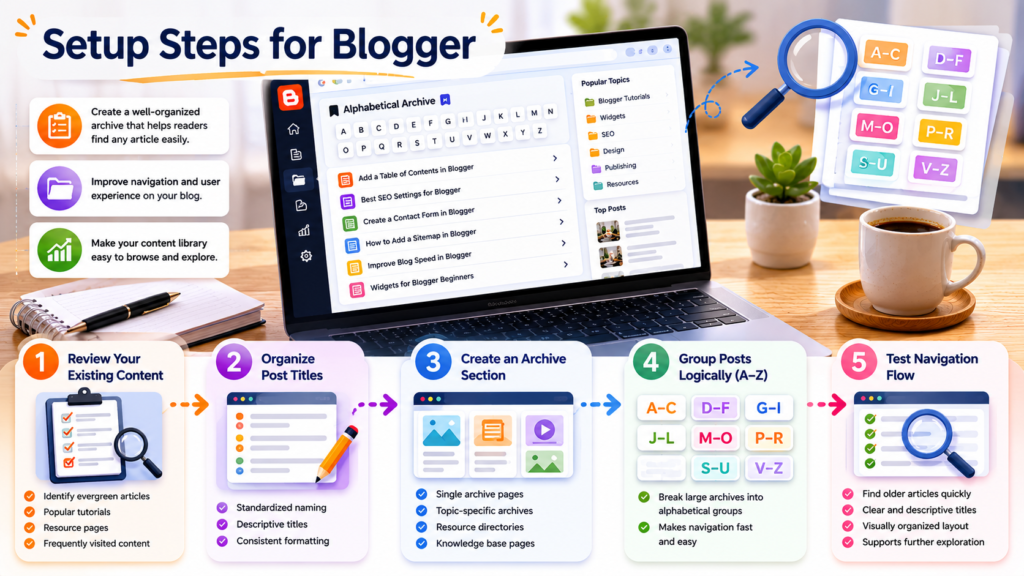
Setup Steps for Blogger
Step 1: Review Your Existing Content
Before creating an archive page, review your content structure.
Identify:
- Important evergreen articles
- Popular tutorials
- Resource pages
- Frequently visited content
This helps determine which posts should be featured prominently.
Step 2: Organize Post Titles
Review article titles for consistency.
Clear titles improve archive usability because readers can easily identify relevant content.
Consider:
- Standardized naming conventions
- Descriptive titles
- Consistent formatting
Well-structured titles make alphabetical archives more effective.
Step 3: Create an Archive Section
Build a dedicated archive page that lists articles alphabetically.
Common approaches include:
- Single archive pages
- Topic-specific archives
- Resource directories
- Knowledge base pages
Choose a format that matches the size of your content library.
Step 4: Group Posts Logically
For larger archives, consider grouping content under alphabetical headings such as:
- A–C
- D–F
- G–I
- J–L
- M–O
- P–R
- S–U
- V–Z
This makes navigation easier for readers browsing extensive collections.
Step 5: Test Navigation Flow
After publishing the archive, evaluate how easily readers can locate content.
Ask:
- Can visitors find older articles quickly?
- Are titles clear and descriptive?
- Is the archive visually organized?
- Does it support further exploration?
The archive should feel like a helpful resource rather than a long list of links.
Archive Design Tips
A successful archive is more than a list of links.
Consider these design improvements:
Use Clear Headings
Alphabetical sections should be easy to identify.
Include Categories
Adding topic information beside each article can improve context.
Highlight Important Content
Feature cornerstone articles near the top of archive sections.
Maintain Visual Consistency
Use styling that matches the rest of the website.
Keep Navigation Simple
Avoid excessive visual clutter that makes scanning difficult.
These principles help transform archives into effective blog archive widgets that improve overall usability.
Supporting a Better Blog Navigation Structure
An alphabetical archive works best when combined with other navigation elements.
Consider using:
- Related posts sections
- Label-based navigation
- Category hubs
- Resource directories
- Search functionality
Together, these systems create a stronger blog navigation structure that helps readers discover more content.
Many bloggers also combine archives with dedicated Blogger customization guides to improve navigation, organization, and user experience across the entire website.
Common Issues
Archive Pages Become Too Long
Large blogs may require multiple archive sections or segmented navigation.
Inconsistent Post Titles
Poorly named articles can make archives difficult to browse.
Outdated Content
Review archive pages periodically and update or remove obsolete resources.
Poor Mobile Experience
Ensure archive layouts remain easy to browse on smaller screens.
Frequently Asked Questions
What is an alphabetical archive?
An archive that organizes post titles from A to Z rather than by publication date.
Is an alphabetical archive better than a date archive?
They serve different purposes. Date archives support chronological browsing, while alphabetical archives improve content discovery.
Can large blogs benefit from alphabetical archives?
Yes. Blogs with substantial content libraries often see improved usability and navigation.
Should every blog have one?
Not necessarily. They are most useful for blogs with many evergreen articles or resource-focused content.
How often should archives be updated?
Ideally, archive pages should update automatically whenever new content is published.
Final Thoughts
An alphabetical post archive is a simple but highly effective navigation tool for Blogger users managing growing content libraries.
Instead of relying exclusively on chronological archives, an A–Z structure allows readers to browse content more efficiently and discover valuable resources that might otherwise remain hidden.
As blogs continue evolving into long-term knowledge libraries, archive usability becomes increasingly important. Well-designed blog archive widgets, a thoughtful blog navigation structure, and practical Blogger customization guides all contribute to a better reader experience and help older content remain useful for years to come.
If you’re looking to improve your site’s organization further, explore additional archive tools, navigation enhancements, and publishing strategies that help readers discover more of your content.