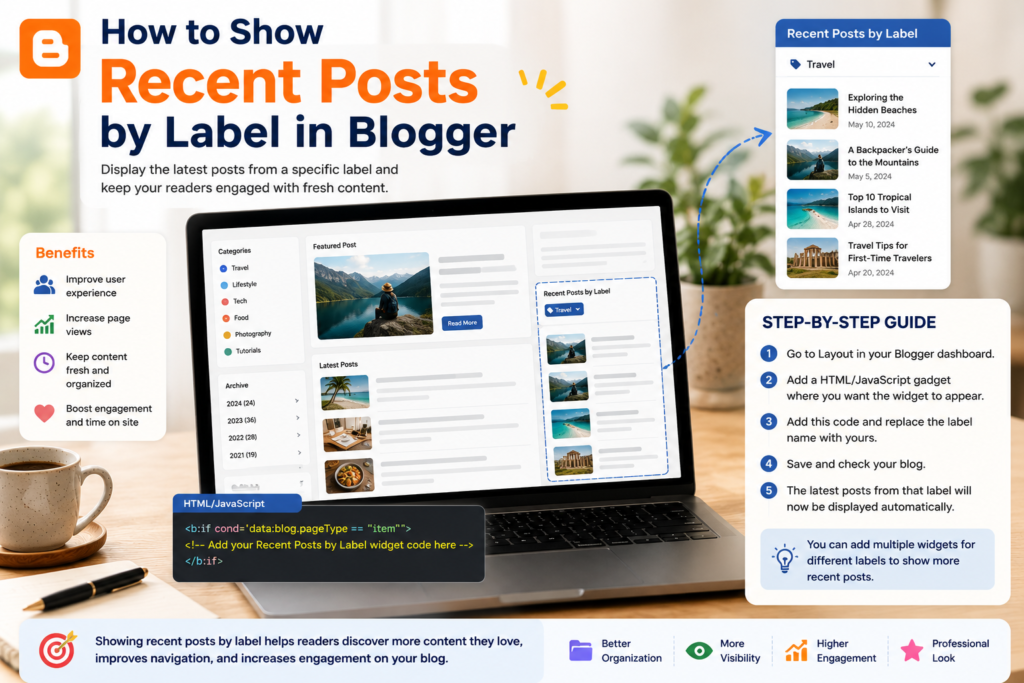
As a blog grows, one challenge becomes increasingly important: helping readers find older content.
Many Blogger users focus on publishing new articles but overlook navigation features that keep existing content visible. Over time, valuable posts can become buried in archives, making them difficult for readers to discover.
One simple solution is displaying recent posts by label. This approach allows Blogger users to show the latest articles from a specific topic directly within the sidebar, homepage, or individual posts. Instead of presenting visitors with a generic list of recent articles, a label-based widget can surface content that is closely related to their interests.
For blogs with growing archives, this small navigation improvement can significantly enhance the reader experience and encourage deeper content exploration.
What Is a Recent Posts by Label Widget?
A Recent Posts by Label widget displays the latest articles from a specific Blogger label.
Labels in Blogger function similarly to categories or content topics. For example, a blog might use labels such as:
- Blogging
- SEO
- Widgets
- Design
- Tutorials
- Content Marketing
A label widget allows you to create focused content sections that automatically update whenever new posts are published under a selected label.
Instead of showing unrelated articles, readers see content directly connected to the topic they are currently viewing.
Why Use Recent Posts by Label?
Many blogs eventually become content libraries rather than simple chronological journals.
When visitors arrive through search engines, they often land on a single article. Without strong navigation, they may never discover related content that could answer additional questions.
A Recent Posts by Label widget helps solve this problem by:
- Improving internal navigation
- Highlighting relevant content
- Encouraging additional page views
- Helping readers explore topic clusters
- Keeping older content visible
- Supporting content discovery
Better navigation helps old posts keep working for readers long after publication.
When Should Blogger Users Use Label Widgets?
Label widgets are particularly useful when:
- Your blog contains multiple content categories
- You publish regularly within specific topics
- You have more than 50 articles
- You want readers to explore related content
- You are building topic-focused content hubs
For newer blogs with only a handful of articles, the impact may be limited. However, once a blog develops a larger archive, structured navigation becomes increasingly important.
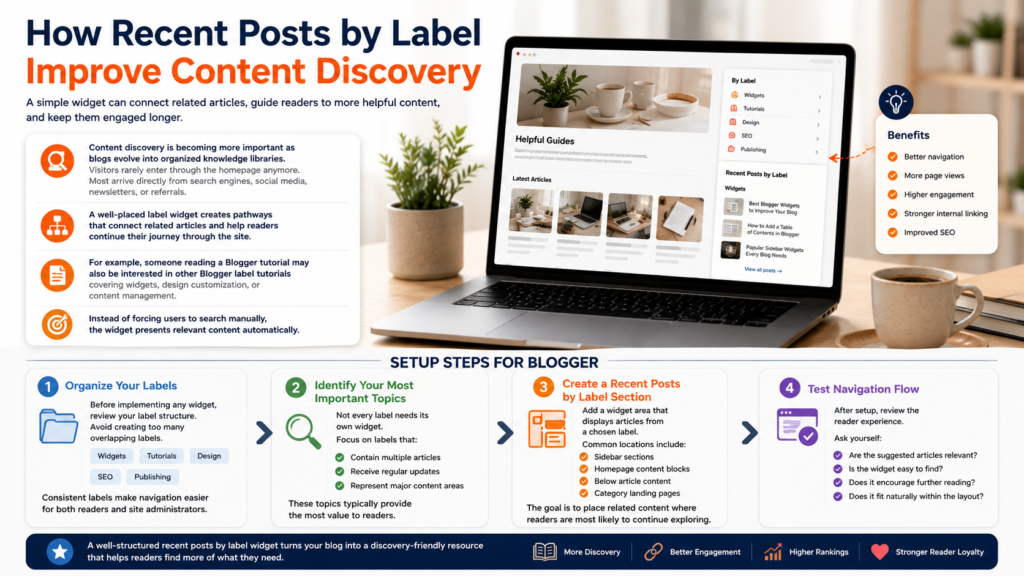
How Recent Posts by Label Improve Content Discovery
Content discovery is becoming more important as blogs evolve into organized knowledge libraries.
Visitors rarely enter through the homepage anymore. Most arrive directly from search engines, social media, newsletters, or referrals.
A well-placed label widget creates pathways that connect related articles and help readers continue their journey through the site.
For example, someone reading a Blogger tutorial may also be interested in other Blogger label tutorials covering widgets, design customization, or content management.
Instead of forcing users to search manually, the widget presents relevant content automatically.
Setup Steps for Blogger
Step 1: Organize Your Labels
Before implementing any widget, review your label structure.
Avoid creating too many overlapping labels.
A clean structure might look like:
- Widgets
- Tutorials
- Design
- SEO
- Publishing
Consistent labels make navigation easier for both readers and site administrators.
Step 2: Identify Your Most Important Topics
Not every label needs its own widget.
Focus on labels that:
- Contain multiple articles
- Receive regular updates
- Represent major content areas
These topics typically provide the most value to readers.
Step 3: Create a Recent Posts by Label Section
Add a widget area that displays articles from a chosen label.
Common locations include:
- Sidebar sections
- Homepage content blocks
- Below article content
- Category landing pages
The goal is to place related content where readers are most likely to continue exploring.
Step 4: Test Navigation Flow
After setup, review the reader experience.
Ask yourself:
- Are the suggested articles relevant?
- Is the widget easy to find?
- Does it encourage further reading?
- Does it fit naturally within the layout?
Navigation widgets should support content discovery without distracting from the main article.
Customization Ideas
A Recent Posts by Label widget can be customized in several ways.
Popular options include:
Display Post Thumbnails
Visual previews often attract more clicks than text-only lists.
Show Publication Dates
Dates help readers identify the newest content.
Limit the Number of Posts
Displaying 5–10 articles is usually sufficient.
Highlight Featured Topics
Popular labels can receive dedicated navigation sections.
Match Your Blog Design
Keep styling consistent with the rest of the website to create a seamless experience.
Common Issues
Too Many Labels
Using excessive labels can create clutter and confusion.
Focus on a smaller number of meaningful content groups.
Empty Label Sections
Avoid displaying widgets for labels with very few articles.
Readers expect useful recommendations, not empty lists.
Irrelevant Recommendations
Review labels regularly to ensure articles are grouped correctly.
Widget Overload
Adding too many widgets can overwhelm visitors.
Prioritize navigation elements that provide the greatest value.
Best Practices for Blog Navigation
A label widget works best as part of a broader navigation strategy.
Consider combining it with:
- Related posts sections
- Featured article blocks
- Category landing pages
- Internal content recommendations
Strong navigation encourages readers to spend more time exploring your content.
If you’re interested in improving site structure further, explore additional blog widgets, discover practical Blogger label tutorials, and apply more blog navigation tips throughout your content library.
Frequently Asked Questions
What is a Blogger label?
A Blogger label is a content classification system used to organize articles by topic.
How is a label different from a category?
In Blogger, labels serve a similar purpose to categories on other publishing platforms.
Should every label have its own widget?
No. Focus on major topics that contain multiple articles and receive ongoing updates.
Can label widgets improve user experience?
Yes. They help readers discover relevant content more easily and navigate large archives more efficiently.
Are label widgets useful for small blogs?
They can be, but their value increases as a blog grows and accumulates more content.
Final Thoughts
A Recent Posts by Label widget is one of the simplest ways to improve navigation within Blogger.
Rather than allowing older articles to disappear into archives, label-based navigation surfaces relevant content exactly when readers are most interested in exploring it.
As blogs continue to grow into structured collections of information, content discovery will become increasingly important. A well-organized label widget helps connect related articles, supports deeper engagement, and ensures that valuable content remains accessible long after it is published.
For more ideas, visit our collection of blog widgets, explore additional Blogger label tutorials, and discover more practical blog navigation tips for building a better reading experience.