One of the first major upgrades many bloggers make is moving from a free Blogger subdomain to a custom domain name.
While a Blogger address such as yourblog.blogspot.com works perfectly for getting started, a custom domain creates a more professional identity and gives you greater control over your publishing presence.
A custom domain is often viewed as a long-term investment because it separates your brand from any single platform. Even if your website evolves in the future, your domain remains under your control.
This guide explains how custom domains work, the DNS concepts involved, and the steps required to connect a custom domain to Blogger.
Why Use a Custom Domain on Blogger?
A custom domain replaces the default Blogspot address with your own domain name.
For example:
Instead of:
myblog.blogspot.com
You could use:
myblog.com
or
www.myblog.com
Benefits include:
- Professional branding
- Easier sharing and memorability
- Greater publishing independence
- Consistent online identity
- Better long-term ownership of your content
A custom domain makes a blog feel like a real publishing asset rather than a temporary project.
Requirements Before You Begin
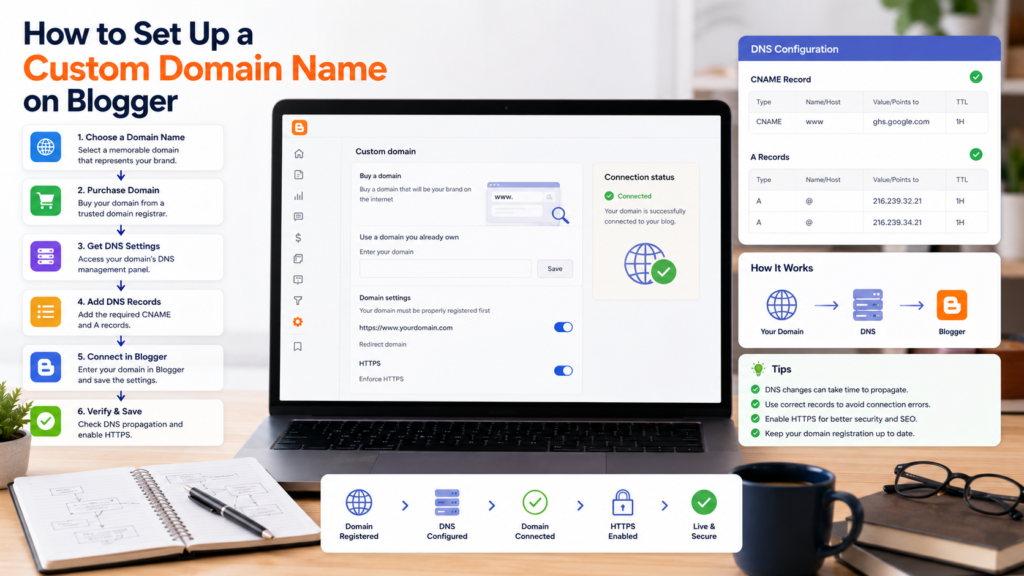
Before connecting a custom domain to Blogger, you’ll need:
A Blogger Account
Your blog must already be active on Blogger.
A Registered Domain Name
Purchase a domain from a domain registrar of your choice.
Access to DNS Settings
You must be able to modify DNS records through your domain provider.
Administrative Access
Ensure you can manage both Blogger settings and domain settings.
Without DNS access, the domain cannot be connected successfully.
Understanding DNS Basics
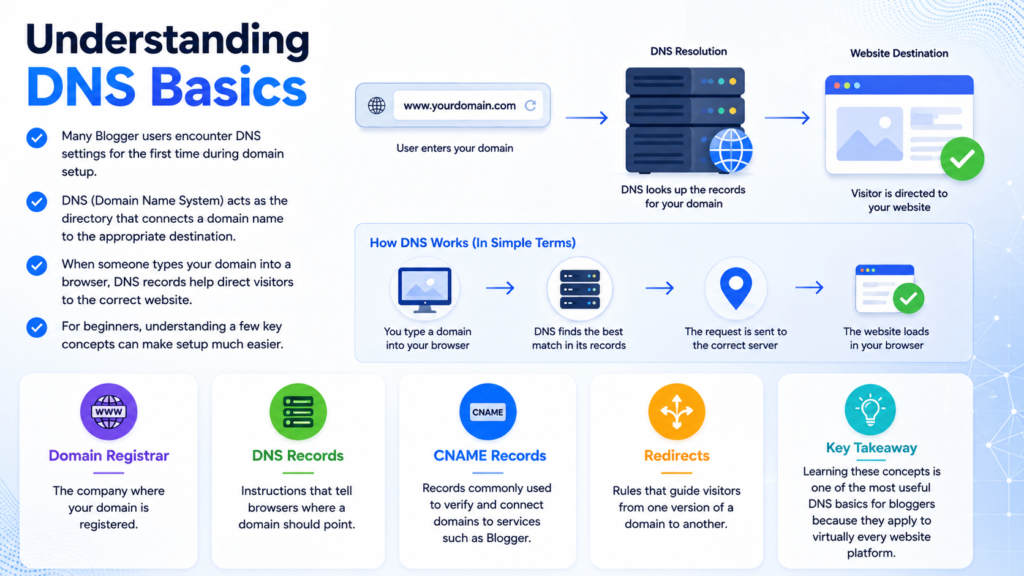
Many Blogger users encounter DNS settings for the first time during domain setup.
DNS (Domain Name System) acts as the directory that connects a domain name to the appropriate destination.
When someone types your domain into a browser, DNS records help direct visitors to the correct website.
For beginners, understanding a few key concepts can make setup much easier.
Domain Registrar
The company where your domain is registered.
DNS Records
Instructions that tell browsers where a domain should point.
CNAME Records
Records commonly used to verify and connect domains to services such as Blogger.
Redirects
Rules that guide visitors from one version of a domain to another.
Learning these concepts is one of the most useful DNS basics for bloggers because they apply to virtually every website platform.
Preparing Your Blogger Settings
Before changing DNS records, begin inside Blogger.
Navigate to:
Settings
Locate the publishing section where custom domain options are available.
Custom Domain
Enter the domain name you want to use.
In most cases, Blogger will provide information needed for verification and configuration.
Make note of any records or instructions displayed by Blogger because they will be needed during DNS setup.
Configuring DNS Records
After obtaining the required information from Blogger, log in to your domain provider’s control panel.
Locate the DNS management section.
Depending on your provider, this may be called:
- DNS Management
- Zone Editor
- DNS Settings
- Domain Settings
Follow the instructions provided by Blogger carefully and ensure records are entered exactly as required.
Even small mistakes can prevent the domain from connecting properly.
Verifying the Connection
After updating DNS settings:
- Save all DNS changes.
- Return to Blogger.
- Verify the custom domain configuration.
- Enable the new domain if verification succeeds.
Keep in mind that DNS updates may take time to propagate across the internet.
Changes can appear immediately or take several hours depending on the provider.
Common DNS Issues
DNS configuration is often the most challenging part of the setup process.
Verification Fails
Double-check all DNS records for accuracy.
DNS Changes Have Not Propagated
Allow additional time before troubleshooting further.
Wrong Record Values
Review all settings carefully and compare them against Blogger’s instructions.
Duplicate Records
Conflicting DNS records can cause connection problems.
Incorrect Domain Formatting
Ensure domain names are entered exactly as required.
These issues account for most failed domain setups.
Publishing Ownership and Long-Term Benefits
Owning your domain provides advantages beyond branding.
A custom domain allows you to:
- Build a long-term publishing identity
- Maintain consistent URLs
- Create a recognizable brand
- Retain flexibility if platforms change
For independent publishers, domain ownership remains one of the most important digital assets available.
As publishing evolves, owning your web address will continue to be valuable.
Best Practices After Connecting a Domain
Once your custom domain is active:
Update Internal Links
Ensure important links use the correct domain.
Verify Site Functionality
Check pages, images, and navigation.
Review Mobile Experience
Test your blog across devices.
Monitor Search Visibility
Verify that pages are accessible and functioning correctly.
Maintain Domain Renewals
Never allow your domain registration to expire.
These small maintenance tasks help ensure long-term stability.
Learning More About Blogger Setup
Connecting a custom domain is often the first step toward building a more professional website.
Many bloggers continue improving their sites by exploring additional Blogger setup guides, learning practical DNS basics for bloggers, and using broader publishing resources to strengthen their online presence.
These foundational skills become increasingly valuable as a website grows.
Frequently Asked Questions
Can I use my own domain with Blogger?
Yes. Blogger supports custom domain connections through DNS configuration.
Do I need technical knowledge?
Basic familiarity with DNS settings is helpful, but most domain providers offer tools that simplify the process.
How long does DNS propagation take?
It can range from a few minutes to several hours depending on the provider and network conditions.
Can I change domains later?
Yes. However, changing domains may require additional configuration and updates.
Is a custom domain worth it?
For most serious bloggers, a custom domain provides long-term branding and ownership benefits.
Final Thoughts
Setting up a custom domain on Blogger is one of the most valuable upgrades a blogger can make.
While the DNS configuration process may seem intimidating at first, understanding the fundamentals makes the process much easier. A custom domain improves branding, strengthens publishing ownership, and creates a more professional online presence.
As independent publishing continues evolving, domain ownership will remain a foundational part of building a sustainable and recognizable website.